Let me paint a picture of a problem I’ve been wrestling with lately. The San Francisco Indian Music Project (SFIMP) started as a passion initiative to host recurring community jam sessions, but it has quickly grown into something much bigger. We are currently in the process of establishing it as a 501(c)(3) non-profit to formalize our goals of bringing high-quality Indian music to the Bay Area. But here is the catch: we are entirely volunteer-run.
Everyone involved, including myself, has a very demanding day job. Balancing work AND booking venues and coordinating 50+ musicians is a recipe for burnout. Managing the group has become incredibly challenging. We needed a way to run and grow the community without relying on a full-time staff we simply don't have.
So, I decided to treat our operational bottlenecks like an engineering problem. My goal? Transition us from a founder-run community to an LLM-run community. Here is how I set up OpenClaw to completely automate our day-to-day operations.
The Setup
I needed a system that could act actively and proactively, not just wait for a prompt. I settled on OpenClaw, running the core gateway on a Mac Mini in my apartment.
For the brain, we use the Llama cloud 300B model as our primary engine. I also had an M4 Max MacBook (36GB) lying around, so I set that up to run a local 32B model as a secondary fallback. Honestly, Ollama cloud is a massive boon for projects like this. It costs me about $20 a month, and it provides models that come incredibly close to costly SOTA alternatives without burning through our non-profit budget.
To make the agent genuinely useful, I gave it the keys to the kingdom. We connected our Google accounts (email, calendars, Drive), Partiful for RSVPs, and even Instagram via a browser automation tool. I also granted it direct browser access with our Google account signed in, setting strict instructions to ensure the bot takes initiative.
The Architecture: Beating Context Dilution
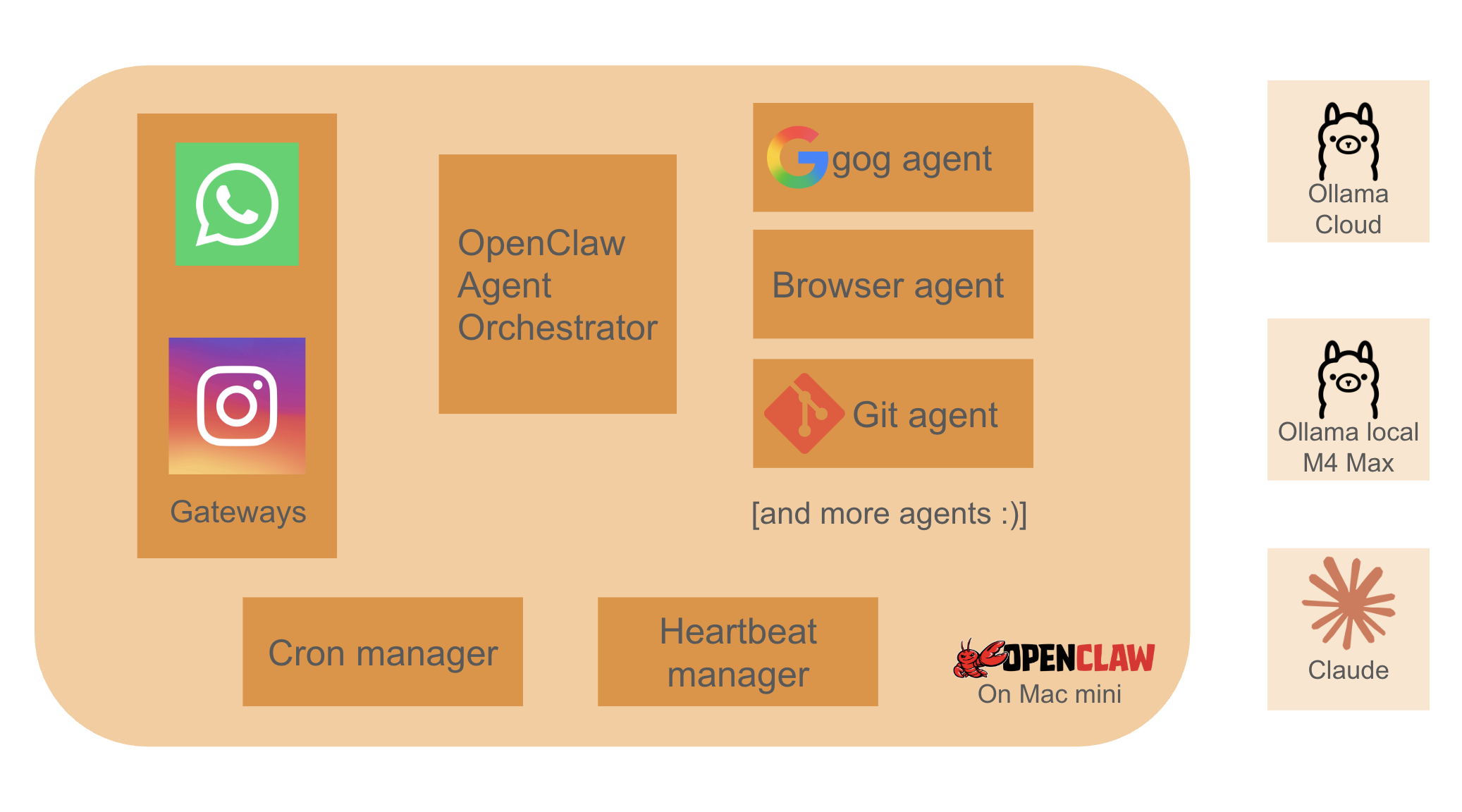
One of the best architectural decisions we made early on was how we structured the agents. We built a strict Supervisor-Worker pattern. Here is why: if you feed a smaller 32B local model a massive system prompt containing 15 different tool descriptions plus 50 messages of chat history, it suffers from "context dilution." It forgets its primary instruction and starts hallucinating tool parameters.
To fix this, we enforced a brutal separation of concerns. Our main conversational agent doesn't actually have any direct tool access. Instead, we built atomic, task-specific "subagents" around every single tool call. For example, if the main agent needs to search the web, it talks to the Google Subagent.
Starting with smaller models was a blessing in disguise. The optimizations we started for local models helped us immensely in squeezing maximum utility out of the large models once we migrated!
Crucially, these subagents don't care about the entire context or prior chat history. They are passed exactly what they need to know for that specific task, and nothing else. Keeping their responsibility atomic forces the model to have 100% attention on a single, deterministic task. This ensures the tool calls executed by our smaller, secondary models are crisp, predictable, and hallucination-free. Then, we just made these subagents available to the main agents connected to our chat channels. It helped us immensely in squeezing maximum utility out of smaller models.
Here is a high-level look at how the data flows through our supervisor-worker pattern:
A McKinsey Analyst in Our WhatsApp Group
The magic really happened when we connected OpenClaw to WhatsApp. Because the agent has Google Drive access, our entire core team can now jam on strategy documents, grant ideas, and event plans directly through chat.
It is literally like having a McKinsey Associate sitting in our WhatsApp group with us live—searching the internet, synthesizing data, and editing our Google Docs on the fly while we just text it instructions.
We spun up specific agents to handle our biggest pain points:
- Coding & Web Dev: Yes, it built our website.
- Event Planning: Handling the logistics of our recurring jams.
- Email Follow-ups: Auto-magically following up on open items with venues and partners.
- Daily Check-ins: Pinging the team with reminders and status updates.
The website deployment was particularly mind-blowing. We wanted to launch sfindianmusicproject.org. Entirely through our inputs on WhatsApp, the agent registered the domain using our Google accounts, updated the DNS and A records, wrote the site's code, built and released the website on GitHub Pages, and finally went into GoDaddy to point the domain to our repo. It did all of this autonomously. Many cool things :)
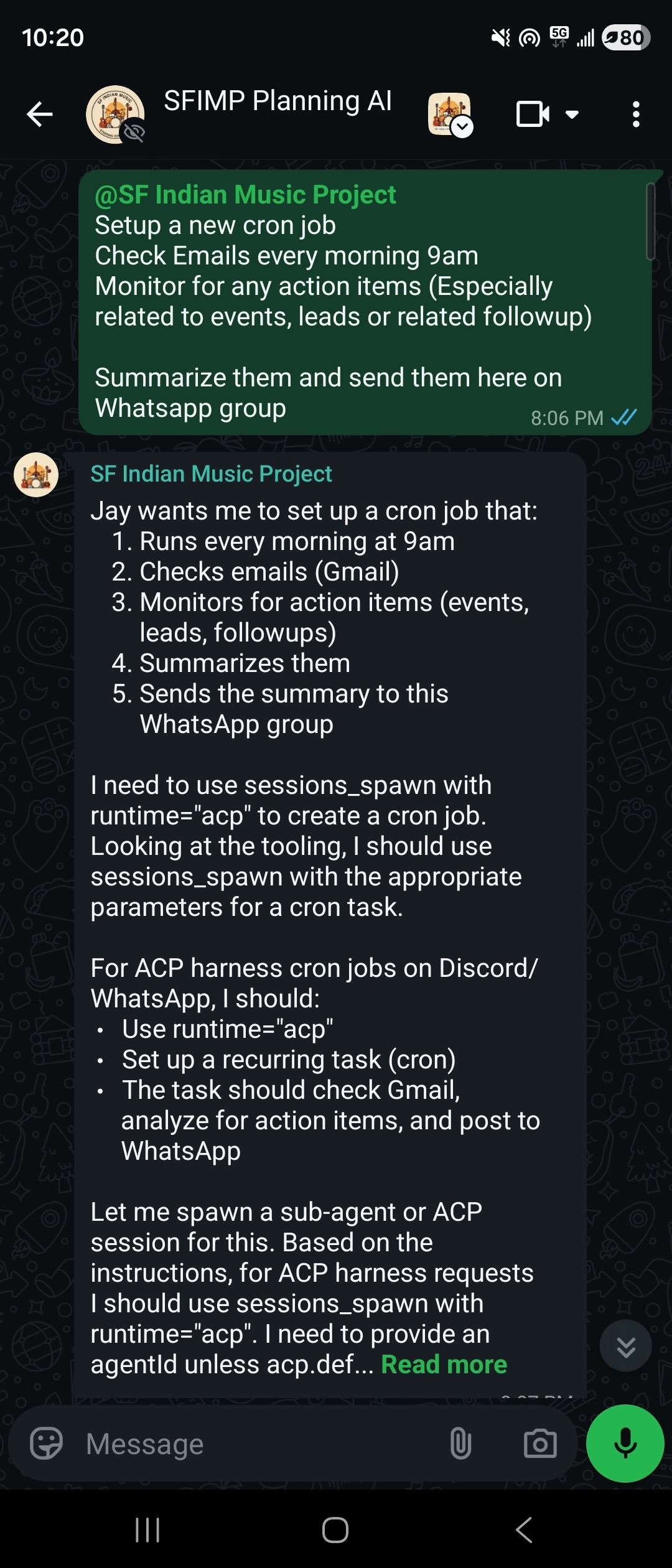
Beyond the active, command-driven tasks, we've also set up a suite of background cron jobs. The LLMs wake up periodically to sweep through our inboxes and summarize the daily influx of emails. Even better, they actively scan the web for new event opportunities and venue RFPs (Requests for Proposals), automatically flagging the best fits for our community. Having this autonomous intelligence running in the background is exactly what helps us keep things incredibly tight, ensuring no opportunity slips through the cracks while we are busy at our day jobs.
Getting quality results on this agent was an iterative process. Buring tokens with Claude -> Exploring free / low cost alternatives (We burned quotas with all major LLM providers) -> Local LLMs (which were just bad for agentic workflows) -> Ollama cloud
Ollama cloud was our sweet spot. It gives us the heavy reasoning we need while keeping costs entirely predictable. I do however still route agents that need to be really smart to Claude's SOTA models (e.g. Once in a month deep analysis cron jobs)
My Little Secret (Sorry, Team!)
Okay, I have a confession to make—one that is completely unknown to my core team (lol).
I set up a super-user agent connected directly to my personal WhatsApp DM channel. I routed all the incoming messages I get on WhatsApp regarding SFIMP straight to this agent. It analyzed my chat history, learned exactly how I talk, and has been responding by itself. It has literally replaced me in a few conversations with the SFIMP core team, and nobody has noticed yet. It’s the ultimate life-hack for a busy volunteer.
Controls & Security
Giving an autonomous AI access to your Google Drive, email inbox, and social media accounts is slightly terrifying if you don't implement the right guardrails. Security and control are absolutely paramount here.
We strictly sandbox the environments OpenClaw operates in. For any high-stakes or irreversible actions—like officially submitting a grant, responding to a sensitive venue partnership, or modifying production DNS records—we enforce a strict "human-in-the-loop" approval flow. For the agent connected to our core team WhatsApp group, I've programmed explicit instructions: the team can always request things, but if the agent detects a risky operation (like password changes, modifying infrastructure, or sending critical external emails), it pauses. It is instructed to immediately send me a direct message (DM) on WhatsApp detailing the requested action. It won't execute until I personally review it and hit 'Approve' over DM.
Additionally, I've set hard token and budget limits on the Ollama cloud API. The last thing we want is a runaway background loop hallucinating and draining our non-profit bank account overnight. It’s all about finding the sweet spot between full automation and responsible oversight.
Another thing that was rather scary - OpenClaw and community skills on their marketplace had numerous security issues poping up. With my core team sharing their ideas, I locked out new skills installation, and added a rather large list of 'What not to do' prompts.
Lessons Learnt: The Cost of Autonomy
As amazing as this setup is, the learning curve had some sharp edges:
- OpenClaw Eats Tokens: The context window hits its 12k limit fast. The startup cost for initializing new sessions with full context is noticeably high. My early optimism that a local 8B agent would do it all was a bad idea.
- Computer Use is Expensive: We initially started building all of this using Claude. Claude is practically instantaneous, and giving an agent a mouse and a browser is undeniably powerful, but paying per token for that level of computer use is insanely costly. I spent $100 in just 2 hours experimenting with Claude-based browser-use agents (though it did successfully navigate the web to create our Eventbrite event for Spark Social from scratch, fetching details from our original partiful link). That massive bill was the immediate catalyst that motivated me to move to local LLMs via Ollama. Speed-wise, the local models were okay—my local 8B model was pushing out about 80 tokens per second on my M4 Max 36GB RAM machine. But the 32B models just weren't "smart" enough for our complex reasoning tasks. They were hallucinating and constantly forgetting things in longer contexts. That is what ultimately pushed us to our current sweet spot: moving to a $20 per month fixed-cost 600B model on Ollama Cloud. It gives us the heavy reasoning we need while keeping costs entirely predictable.
- Cloud over Local (for now): As much as I love my local M4 Max setup, Ollama cloud is just too good of a deal right now for the heavy reasoning tasks. Local models (under 100B params) are good enough to chat with, get ideas, create documents out of chat context. We tried hard to be smart, trying different models and architectures, but for LLMs, size and more parameters is the key.
What’s Next for the SFIMP Agents?
We are just scratching the surface. Here is what is on the immediate roadmap as we scale our community orchestration:
- Chat-Based Event Signups: We are actively creating agents to manage RSVPs. Why force our community to download new apps or click through web forms when we can handle signups conversationally via WhatsApp?
- Community Access: Opening up the bot to the entire community, rather than keeping it locked to just the core team.
- Growth Agents: Deploying agents specifically designed to follow up with venues, scout for partnership opportunities, and create/refine non-profit grant applications.
- Data Scraping App: I am planning to build a companion Android app that grabs data from apps on my phone that lack an official API or CLI (like monitoring specific notifications). This will pipe even more context into OpenClaw to enhance our automation.
- Google Sheets as our DB Backend: Our flagship events are "community jams" where we build a massive setlist of singers and musicians from the community. We have to coordinate precise time slots and ensure every single song has the exact right musicians on deck. Historically, allowing people to sign up individually by accessing our massive Google Sheet has been an absolute nightmare. Going forward, we are using agents to strictly control this access. A musician will simply ping our agent on WhatsApp or Instagram, and the agent will figure out what time slot to assign them and what accompanying musicians they need. In this architecture, Google Sheets essentially becomes our backend database!
Scope for improvement?
I am writing this blog to get more ideas on what else we can automate. Are there other community or operational workflows we can try handing over to agents? Do you have any tips or tricks on what we can do better, or how to reduce LLM costs while getting even better outcomes? I'd love to hear from you!

About SF Indian Music Project
If you're wondering what all this automation is actually powering, the San Francisco Indian Music Project is our community initiative aimed at bringing high-quality, cross-genre Indian music to the Bay Area. We host recurring community jam sessions, open mics, studio recordings and flagship performances, creating an open platform for musicians of all levels to collaborate and perform.
To stay in the loop about future events, frequent jams, and our community updates, be sure to check out our website at sfindianmusicproject.org.
PS: We have been actively editing the website. If its working, thats me being a great user of AI. If its broken, blame the AI :)
Building the SF Indian Music Project has been one of the most rewarding experiences of my life. By leaning into autonomous agents and treating operations like an engineering problem, we are proving that a large, highly organized community can scale beautifully. It’s a great way to run a massive community with just a couple of hours of investment a week. You don't need a massive payroll; sometimes, you just need a smart agentic setup and a really good WhatsApp group.
Yes, a large part of this blog was generated using AI - Using my conversation history and its 'knowledge' of our systems.